Getting started with Claude Code mods
Build your first Claude Code mod from an empty folder, then see what else the API can do.
Claude Code already lets you change a lot about how it behaves: settings, permission rules, slash commands, skills and a status line. Mods go further. Mods can rewrite or replace what Claude Code does, and can even draw custom UI. Under the hood, mods are hooks, and they ship inside plugins. Each one is a small JavaScript or TypeScript module that runs inside your session and sees every event as it happens.
That makes mods a way to fit Claude Code to how you work. You can add a readout you check all the time, put a guard in front of the commands that make you nervous, or build a review view for how you like to read changes.
This guide builds one mod from an empty folder, Token Weather, a live forecast of the context window drawn above the prompt. It's about 80 lines. Then it tours two larger mods, Blast Radius and Replay Theater, to show what else the API can do.

Claude Code 2.1.287 or later. Mods are on by default, so there's nothing to turn on. The API can change between releases. Each time Claude Code loads a mod, it writes the type declarations for your build into the mod's .claude-plugin/types/ folder, and those are the authority for your version.
HOW A MOD WORKS
A mod is a Claude Code plugin whose behavior lives in a JavaScript or TypeScript module:
- The folder is a normal plugin, with a
.claude-plugin/plugin.jsonmanifest. hooks/hooks.jsonnames one module undermodules.- The module exports
register(on, options). Inside it,on(event, matcher?, hook)adds a hook.
Every hook has the same shape:
on("tool.call", { tool: "Bash" }, async ($, e, next) => {
  // $    the mods API: ui, session, state, store, fs, process, clock, http, tool, command, model, ...
  // e    this event's input, as plain data
  // next passes e to the other plugins and then to Claude Code's own behavior
  return next(e);
});
Hooks form a chain, like middleware. Yours runs, next(e) hands the event to the next plugin, and at the bottom Claude Code does what it would have done anyway. A hook can do one of three things:
| Move | How | Example |
|---|---|---|
| Observe | const r = await next(e); /* look */ return r | Record every file edit. Take a reading after each turn. |
| Rewrite | return next({ ...e, command: safer }) | Change what the rest of the chain sees. |
| Answer | return { deny: "…" } without calling next | Refuse a tool call. Serve a command or a tool yourself. |
The events cover tool calls, the prompt as submitted, turns starting and finishing, the session starting and ending, slash commands, and ui.render: every piece of the interface as it's drawn. The module runs in a sandbox of its own, with no DOM and no Node, so everything outside it goes through $.
How this differs from settings hooks. A settings hook runs a shell command for each event and passes JSON over stdin and stdout. A mod is loaded once and stays in the session. It can keep state, draw UI that updates as events happen, and call back into Claude Code: open a pane, run a process, register a slash command, or register a tool the model can call.
Claude Code uses them itself. Some of Claude Code's own features are built as mods, including AGENTS.md support and the /diff pane beside the conversation. Their source, with tests, is in the public anthropics/claude-code repository under mods/, so you can read how the team builds them.
BUILD YOUR FIRST MOD: TOKEN WEATHER
Token Weather reads how full the context window is after each turn and draws one line above the prompt: a weather icon, the percentage, the tokens used out of the window, a small chart of recent turns, and how much the last turn added.
| Used | Forecast |
|---|---|
| under 25% | ☀ Clear |
| 25–49% | ☁ Cloudy |
| 50–74% | ☂ Showers |
| 75–89% | ☇ Storm |
| 90% and up | ↯ Compact soon |
Here it is in a real session. Each turn reads more files, and the band fills from ☀ Clear to ☂ Showers to ☇ Storm:
The shortcut: let Claude build it
You can skip the six steps. Claude Code knows how to write mods, so you can describe the one you want and let it do the work. Start a session with claude and paste the prompt below:
Make me a Claude Code mod called token-weather: a live forecast of my context window, shown in the band above the prompt.

What it should show, on one line:
- A weather icon and word for how full the context window is: under 25% ☀ Clear (yellow), 25–49% ☁ Cloudy (cyan), 50–74% ☂ Showers (blue), 75–89% ☇ Storm (magenta), 90% and up ↯ Compact soon (red).
- The percentage used, then the tokens used out of the window, like "134.4k / 200k".
- A small chart of the last 12 turns, drawn with ▁▂▃▄▅▆▇█.
- How much the last turn added, like "▲ +98.3k last turn".

It should update after every turn.
Claude asks once whether to turn on hot reloading for the session. Allow it, and the band appears above the prompt when Claude's turn ends. From then on, every change reloads in place, so you can keep asking for tweaks ("make Storm start at 70%", "add the dollar cost at the end") and watch the band change. The mod loads only in this session, and its folder is cleaned up later, so to keep it, copy the folder out and install it like any plugin (Step 6).
Notice that the prompt only describes what you want to see. You don't need to know the API to write one. Claude Code's built-in guide for writing mods covers the how: where to keep state so it survives a reload, how to check the plugin with claude plugin validate, and which events to hook. Change the "What it should show" lines and it's your mod, not ours.
If you'd rather see how it's put together first, or want to check what Claude wrote, read on.
Step 1: Create the folder
Check that your Claude Code is new enough:
claude --version # 2.1.287 or later
Create this layout:
token-weather/
├── .claude-plugin/
│   ├── plugin.json
│   └── types/            (written by Claude Code when it loads the mod)
├── hooks/
│   ├── hooks.json
│   └── token-weather.mjs
├── types/
│   └── index.d.ts        (added in step 3)
└── tests/
    └── token-weather.test.ts   (added in step 5)
.claude-plugin/plugin.json is a standard plugin manifest:
{
  "name": "token-weather",
  "version": "0.1.0",
  "description": "A live forecast of the context window, drawn above the prompt.",
  "author": { "name": "You" }
}
hooks/hooks.json points at the module. A mod has exactly one:
{
  "modules": ["./token-weather.mjs"]
}
Step 2: Draw something
The band directly above the prompt is a component called AbovePrompt. Claude Code draws nothing there itself, so it's a good first target. Hook its ui.render event and return a tree of elements:
// hooks/token-weather.mjs
export function register(on) {
  on("ui.render", { component: "AbovePrompt" }, ($, e, next) => {
    const { Box, Text } = $.ui.resolve(e);
    return Box({
      paddingX: 1,
      children: [Text({ color: "yellow", bold: true, children: "☀  Clear skies" })],
    });
  });
}
The elements aren't globals. $.ui.resolve(e) returns the constructors for the surface being drawn, because each surface Claude Code draws on supports a slightly different set. JSX works too, with h as the factory.
Start a session with the plugin loaded:
claude --plugin-dir ./token-weather"☀ Clear skies" appears above the prompt. Keep the session open. The folder is watched, so every save reloads the module in place, with no restart. That quick feedback loop is most of what makes mods fun to write.
Tip: Once you know the shape, describe the next mod to Claude the way the shortcut does. It writes the plugin to a folder that hot-reloads in the same session.
Step 3: Read real numbers and keep them in $.state
$.session.usage() returns the same figures as the status line. context.tokens is the input the last response was answered over, context.window is the model's window, and context.percent is one over the other. The call is free: it only sends a token-count request if you ask for a breakdown.
Take a reading when the session starts and after every turn:
on("session.start", async ($, e, next) => {
  const result = await next(e);
  await takeReading($);
  return result;
});

on("turn.complete", async ($, e, next) => {
  const result = await next(e);
  if (!e.agentId) {
    await takeReading($); // main-loop turns only, not subagents
  }
  return result;
});
Both hooks call next(e) first and then observe. Neither one changes what happens.
Where to keep the readings. A module-level let readings = [] looks like the obvious choice, but a hot reload is a fresh load: register runs again, session.start fires again, and module variables start over. Put the history in $.state instead. It holds named values in the host for the whole session, and they survive reloads.
// Held by the host, so the history survives a hot reload of this file.
const readings = { plugin: "token-weather", key: "readings" };

async function takeReading($) {
  const { context } = await $.session.usage();
  if (!context?.window) return;
  const tokens = context.tokens ?? 0;
  const percent = context.percent ?? Math.round((tokens / context.window) * 100);
  const { value: history = [] } = await $.state.get(readings);
  await $.state.set(readings, [...history, { tokens, window: context.window, percent }].slice(-HISTORY));
}
A state value is declared in the plugin's type contract, which is a small .d.ts file the manifest points to. Add types/index.d.ts:
export type TokenWeatherReading = { tokens: number; window: number; percent: number };

declare module "claude-code" {
  interface PluginState {
    "token-weather": { readings: TokenWeatherReading[] };
  }
}
Then add "types": "./types/index.d.ts" to plugin.json. If you skip this step, claude plugin validate stops you with an error that names the fix: token-weather.readings is not declared: the manifest's types contract must name it in interface PluginState { … }.
In return, you get redraws for free. A $.state.get made while a render hook runs subscribes that drawing, so every later $.state.set redraws the band. You never call $.ui.invalidate.
Step 4: Draw the forecast
Here is the whole module:
// Token Weather: a live forecast of the context window, above the prompt.

const HISTORY = 12;
const BARS = "▁▂▃▄▅▆▇█";
const FORECAST = [
  { upTo: 25, icon: "☀", word: "Clear", color: "yellow" },
  { upTo: 50, icon: "☁", word: "Cloudy", color: "cyan" },
  { upTo: 75, icon: "☂", word: "Showers", color: "blue" },
  { upTo: 90, icon: "☇", word: "Storm", color: "magenta" },
  { upTo: Infinity, icon: "↯", word: "Compact soon", color: "red" },
];

// Held by the host, so the history survives a hot reload of this file.
const readings = { plugin: "token-weather", key: "readings" };

export function register(on) {
  on("session.start", async ($, e, next) => {
    const result = await next(e);
    await takeReading($);
    return result;
  });

  on("turn.complete", async ($, e, next) => {
    const result = await next(e);
    if (!e.agentId) {
      await takeReading($); // main-loop turns only, not subagents
    }
    return result;
  });

  on("ui.render", { component: "AbovePrompt" }, async ($, e, next) => {
    const { value: history = [] } = await $.state.get(readings);
    if (e.props.hasSurvey || history.length === 0) {
      return next(e);
    }
    const { Box, Text } = $.ui.resolve(e);
    return band(Box, Text, history, e.props.bodyColumns);
  });
}

async function takeReading($) {
  const { context } = await $.session.usage();
  if (!context?.window) return;
  const tokens = context.tokens ?? 0;
  const percent = context.percent ?? Math.round((tokens / context.window) * 100);
  const { value: history = [] } = await $.state.get(readings);
  await $.state.set(readings, [...history, { tokens, window: context.window, percent }].slice(-HISTORY));
}

function band(Box, Text, history, columns) {
  const now = history[history.length - 1];
  const f = FORECAST.find((b) => now.percent < b.upTo);
  const parts = [
    Text({ color: f.color, bold: true, children: `${f.icon}  ${f.word}` }),
    Text({ children: `  ${now.percent}% of context` }),
    Text({ dimColor: true, children: `  ${short(now.tokens)} / ${short(now.window)}` }),
  ];
  if (columns >= 60) {
    parts.push(Text({ dimColor: true, children: "   last turns " }));
    parts.push(Text({ color: f.color, children: sparkline(history) }));
    if (history.length > 1) {
      parts.push(Text({ dimColor: true, children: trend(history) }));
    }
  }
  return Box({ flexDirection: "row", paddingX: 1, children: parts });
}

function sparkline(history) {
  const top = Math.max(...history.map((r) => r.tokens), 1);
  return history.map((r) => BARS[Math.floor((r.tokens / top) * (BARS.length - 1))]).join("");
}

function trend(history) {
  const delta = history[history.length - 1].tokens - history[history.length - 2].tokens;
  if (delta === 0) return "  steady";
  return delta > 0 ? `  ▲ +${short(delta)} last turn` : `  ▼ ${short(-delta)} last turn`;
}

function short(n) {
  if (n >= 1_000_000) return `${+(n / 1_000_000).toFixed(1)}M`;
  if (n >= 1_000) return `${+(n / 1_000).toFixed(1)}k`;
  return String(n);
}
Three details are worth copying into your own mods:
- The component's props are on
e.props.hasSurveytells you a survey wants the band, so the hook yields to it withnext(e).bodyColumnsis the band's real width, which is narrower than the terminal while a pane is docked beside the transcript. Size the tree to it. Onlye.component,e.surface,e.requestIdande.viewportsit at the top level ofe. - Pass when you have nothing to draw. Returning
next(e)gives the band back to Claude Code and to other mods. - Use single-width symbols, not emoji. ☀ ☁ ☂ ☇ ↯ line up in every terminal font.
Save the file and the running session picks it up. After a few turns that read large files, the band moves from Clear to Showers to Storm, as in the recording at the start of this section.
Step 5: Validate and test
claude plugin validate reads the manifest and the module's source the same way Claude Code will, and reports what the module hooks and calls:
$ claude plugin validate ./token-weather
  > types ./types/index.d.ts declares state: token-weather.readings
  > ./token-weather.mjs hooks: session.start, turn.complete, ui.render{component=AbovePrompt}
  > ./token-weather.mjs calls: $.session.usage (via takeReading), $.state.get, $.state.set (via takeReading), $.ui.resolve
  > ./token-weather.mjs state writes: token-weather.readings
  > ./token-weather.mjs state reads: token-weather.readings
√ Validation passed
claude plugin test runs the plugin's *.test.ts files against the real Claude Code runtime. Hooks that a test registers with on run after the mod in the chain and stub what Claude Code would answer, so you control exactly what $.session.usage() returns:
// tests/token-weather.test.ts
import { describe, expect, test } from "claude-code/testing";

describe("token-weather", () => {
  test("the band follows the context window", async ($, on) => {
    // Hooks registered here run after the mod and stub what Claude Code would answer.
    let tokens = 36_100;
    on("session.start", ($, e) => ({ cwd: e.cwd }));
    on("session.usage", () => ({
      value: { startedAt: 0, rateLimits: [], context: { tokens, window: 200_000, percent: Math.round(tokens / 2_000) } },
    }));
    on("turn.complete", () => ({ text: "" }));

    await $.session.start({ surface: "terminal", isInteractive: true, cwd: "/work" } as any);
    const ui = await $.ui.mount({
      plugin: "token-weather",
      surface: "terminal",
      component: "AbovePrompt",
      props: { hasSurvey: false, isWorking: false, maxRows: 10, bodyColumns: 120 },
    } as any);
    expect(await ui.find({ type: "Text", text: /Clear/ })).toBeDefined();

    tokens = 134_400;
    await $.turn.complete({ reason: "answer", answer: "ok", durationMs: 1 } as any);
    expect(await ui.find({ type: "Text", text: /Showers/ })).toBeDefined();
    expect(await ui.find({ type: "Text", text: /67% of context/ })).toBeDefined();
    expect(await ui.find({ type: "Text", text: /▲ \+98\.3k last turn/ })).toBeDefined();
    await ui.unmount();
  });
});
$ claude plugin test ./token-weather
(pass) token-weather > the band follows the context window
 1 pass
 0 fail
The test also checks the redraw behavior from step 3. The band updates after turn.complete without the mod ever asking for a redraw.
Step 6: Share it
A mod is a plugin, so it ships the same way. Put it in a marketplace, which can be as simple as a folder with a .claude-plugin/marketplace.json:
{
  "name": "my-mods",
  "owner": { "name": "You" },
  "plugins": [{ "name": "token-weather", "source": "./token-weather" }]
}
claude plugin marketplace add ./my-mods
claude plugin install token-weather@my-mods --scope user
SHARING YOUR MOD
A mod is a Claude Code plugin, so you share it the same way as any other plugin, and there's nothing new to learn. Put the mod in a GitHub repo with a marketplace file and that repo becomes your marketplace. Anyone can install from it, and you can update it with a normal push.
Installing takes three commands in Claude Code:
/plugin marketplace add your-org/my-mods
/plugin install token-weather@my-mods
/reload-plugins
The mod starts when you reload. If it doesn't show up, restart Claude Code.
A mod is code that runs inside Claude Code on your machine, with the same access Claude Code has, and it's written by its publisher, not Anthropic. So install mods the way you'd install a package: read the repo first and only install from people you trust. Nothing gets installed until you run the command.
Once the Claude directory accepts plugins that include mods, you'll also be able to submit yours at claude.ai/directory/manage, so people can find it without a link from you.
TWO MORE MODS
Token Weather only watches and draws. The next two mods step into events, open panes, and take input.
Blast Radius: see what a risky command would change before it runs
When Claude calls Bash with rm -rf, git reset --hard, git clean, a force push, or a database migration, Blast Radius holds the call. It works out what the command would touch and opens a pane with Proceed and Cancel. Press 2 and Claude gets a refusal with the reason. Press 1 and the command runs as written.
It uses three hooks: tool.call on Bash, and ui.render on Pane and on AbovePrompt. The core of it is the "answer" move from the table above:
on("tool.call", { tool: "Bash" }, async ($, e, next) => {
  const risk = classify(String(e.command ?? ""));
  if (risk === null) return next(e);                 // everything else runs as normal

  const report = await measure($, risk, await $.session.cwd());  // git status, git clean -n, du, ...
  held = { command: e.command, risk, report, decision: null };
  const opened = await $.ui.open({ id: "blast-radius", title: "Blast Radius", focus: true });
  if (!opened.isPlaced) held.where = "band";         // too narrow for a pane: draw above the prompt

  while (held.decision === null && !next.signal.aborted) {
    await $.process.run(["sleep", "0.25"]);          // time inside $ calls doesn't count against the hook's time limit
  }
  if (held.decision === "proceed") return next(e);   // let it run
  return { deny: `Blast Radius held this command: the user pressed Cancel. It would have: ${report.summary}.` };
});
What it teaches:
$.process.runfor dry runs. The report comes from the tools' own commands:git status --porcelain,git clean -n,git log HEAD..origin/main,showmigrations. Arguments go in as an argv array, so nothing in a path is run as shell code.- Holding a call. A hook gets 10 seconds of its own time per dispatch, but time spent waiting inside a
$call doesn't count. The loop waits on shortsleepprocesses until a button'sonPresssets the decision, and it gives up whennext.signalaborts (you pressed Esc). - Buttons with hotkeys.
Button({ label: "Proceed", hotkey: "1", onPress })works by click, by Tab and Enter, or by the digit. - Degrade to the band. The terminal docks a pane beside the transcript when it's wide enough. When
$.ui.openanswersisPlaced: false, the same report is drawn above the prompt:
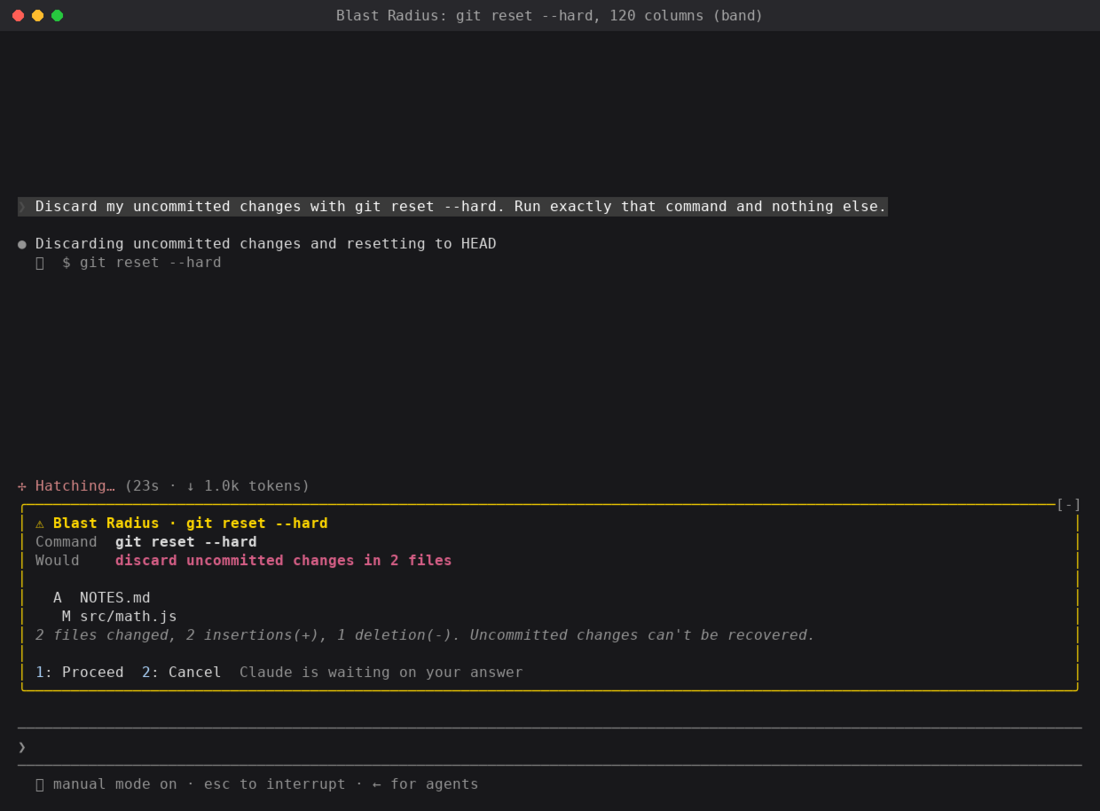
It's a safety net, not a permission system. It reads the command text, so $(…), aliases and scripts that call rm get past it. Use permission rules for a hard block.
Replay Theater: step through the last turn's edits
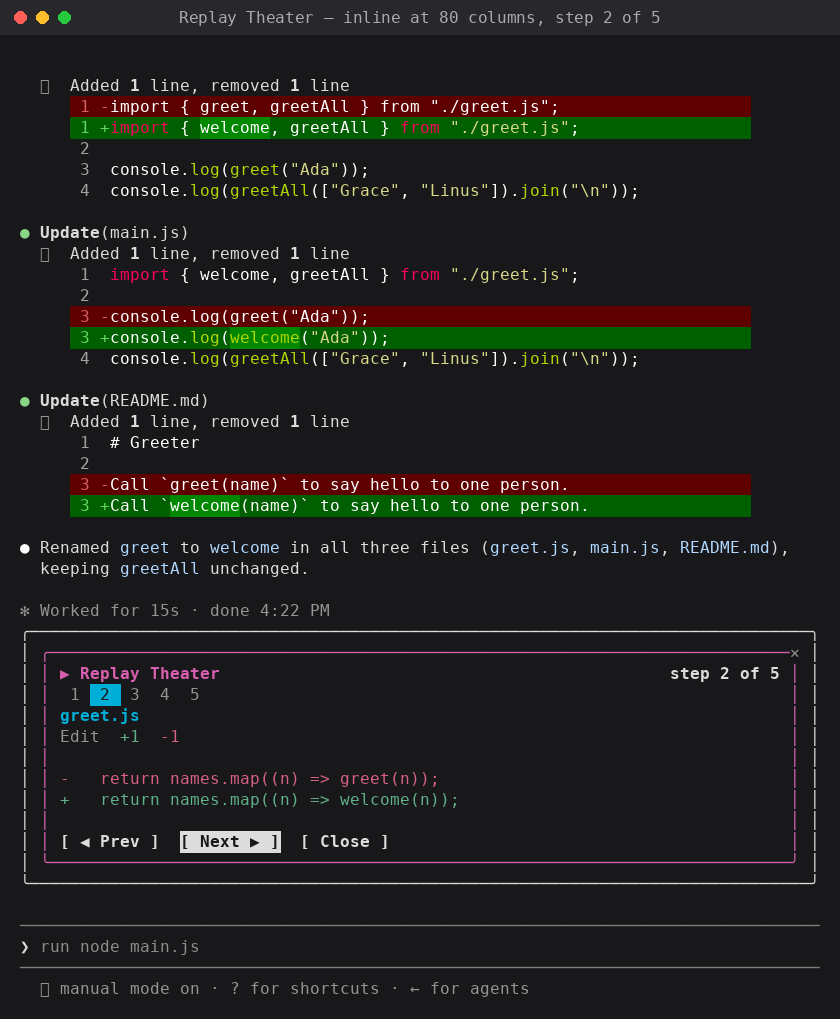
While a turn runs, Replay Theater records every Edit and Write call: the file, plus the text before and after. When the turn ends, a hint appears above the prompt. Press r (or type /replay) and a pane walks through the edits one diff at a time, with a strip of numbered steps and Prev, Next and Close buttons.
It never blocks or changes an edit. It observes:
on("tool.call", async ($, e, next) => {
  if (EDIT_TOOLS.has(e.tool)) state.pending.push(...(await stepsFor($, e)));  // old/new text → diff
  return next(e);                                                              // the edit runs untouched
});

on("turn.start", ($, e, next) => { if (!e.agentId) state.pending = []; return next(e); });

on("turn.complete", async ($, e, next) => {
  const r = await next(e);
  if (!e.agentId && state.pending.length) state.replay = state.pending;       // one replay per turn
  return r;
});

on("session.start", async ($, e, next) => {
  const r = await next(e);
  await $.command.register({ name: "replay", description: "Step through the last turn's file edits" });
  return r;
});
on("command.run", { command: "replay" }, async ($, e) => ({ text: (await openReplay($)) ? "Replaying" : "No edits" }));
What it teaches:
- Pairing events.
turn.startandturn.completebracket the edits into one replay per turn, ande.agentIdkeeps subagent turns out of the grouping. - Registering a slash command.
$.command.registerinsession.start, then answer it oncommand.run. - Reading files. For a Write,
$.fs.readgets the old contents just before the write lands, so the diff is real. - Placement is the surface's job. In fullscreen the pane docks on the right. At 80 columns it opens inline above the prompt. The mod draws the same tree either way.
FOUR HABITS WORTH KEEPING
- Lean on the types Claude Code writes for you. Each time it loads your mod, Claude Code writes the declarations for your build into the mod's
.claude-plugin/types/folder, so your editor andtsc -pwork with no extra step. They're the reference for every event, every method on$and every element's props. - Read props from
e.props.hasSurvey,bodyColumnsand the rest live there, not oneitself. - Plan for hot reload. Every save runs
registerandsession.startagain, so keep data in$.state, not in module variables. - When a drawing doesn't show, read the log. Run
claude --debugand look for a line saying a hook returned a tree that does not validate.
WHAT WILL YOU MOD?
The three mods here came from one question each: how full is my context?, what is this command about to delete?, and what did Claude just change? Your questions will be different, and that's the point. Some ideas to start from:
- A cost or rate-limit meter from
$.session.usage(), as a status line with$.ui.status - A
prompt.submithook that adds your team's conventions to every prompt - A pane that lists the files Claude read this session, as a live map of what it has seen
- A focus timer that sends a toast with
$.ui.toastwhen a long turn finishes - A
tool.callguard tuned to your stack, such as production kubectl contexts orterraform apply
Share what you build
Made a mod you now use every day? Post it on X or LinkedIn with a GIF or a screenshot of it running, so other developers can see what's possible. Put the plugin in a marketplace (Sharing your mod) and link to it, so anyone who likes it can install it with three commands.